|
| Websites of Interest |
|
Here is a collection
of interesting websites in support of our mission to
enlighten our users on the art of copying, maintaining and organizing
your photographs. If you have any web sites of
your own that you think would be of interest to the group, please
email us at: contactus@shotcopy.com
Please include
the website address and a brief description of the site.
Click a title
below for more information:
|
|
|
|
FAQ -
Frequently Asked Questions |
|
Here is a collection
of frequently asked questions from our customers that will find
beneficial in making a decision to purchase ShotCopy. If your question
is not answered here please feel free to submit your email question
to:
contactus@shotcopy.com
Click a FAQ title
below for more information:
|
My husband is looking at your product to make copies
of older slides for his thesis presentation. We do not have a digital
camera. The MVC-FD92 that you have on the website, is that a model you
recommend? Are there other models that you can recommend we look at?
Also, what do you look for that would tell you that the camera can in
fact, focus with in a inch of the lens??? Thanks for your help,
Delia D. |
|
Click Here for the Answer |
|
Will the shot copy work with a canon G-2? I have some 55mm
close up lenses( 1,2,&3) but I assume I'll have to get some 58mm. What
do you recommend -the 1, 2 or 3 or perhaps all three. Also what is
the price of your equipment. Ed P. |
|
Click Here for the Answer |
|
|
|
| Today, most digital cameras
have macro focus capability |
| What this means
to you is that you can now easily copy your 35mm slides, negatives and
prints with this built-in macro focus close-up feature.
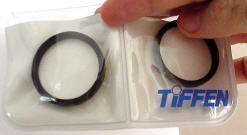
Don't have macro lens - check
these out:
Diopter Lens - Click for video
ShotCopy allows you the
flexibility to move up as higher resolution cameras become available
in the future - saving you time and money from using devices like
flatbed scanners and camera lens extenders that become obsolete when
you change out your camera.
|
| ShotCopy
Tips & Tricks News Archive |
| What's New & Coming Soon... |
|
o |
Did you know you can use ShotCopy
with your iPhone 4 series smart phone? |
| |
Answer: Click for Video |
|
o |
ShotCopy is building new videos.
"If a picture is worth a thousand words - then video makes it
obvious." |
| |
Answer: Click for Video |
|
o |
How do I remove the orange cast
when copying color negatives? |
| |
Article coming soon |
|
o |
Which is better: Copy the
negative and use my PC software to convert it to a positive or let the
digital camera convert it to a positive? |
|
Article coming soon |
|
o |
What type of light source
should I use to illuminate my photographs when copying? |
| |
Answer: Click for Video |
|
o |
Slide copying tricks for
recovering from a bad exposure. |
|
|
Article coming soon |
|
|
How to Create a Photo Album
Presentation in PowerPoint 2002 and later... |
Did
you know you could use PowerPoint 2002 to create a photo album? Here's
how.
On the Insert menu, point to Picture, and then click New Photo Album.
In the Photo Album dialog box, you can choose to add pictures from
your hard disk or a peripheral device, such as a scanner or digital
camera. To add a picture from a file or disk, do the following: Under
Insert picture from, click File/Disk. Locate the folder or disk that
contains the picture you want to add to your photo album, click the
picture file, and then click Insert. Repeat Step 2 for as many
pictures as you want to add to your photo album. Or to capture them
all at once, hold down the CTRL key, click each picture file you need,
and then click Insert. Next, specify the look of the album under Album
Layout. Then click Create." ! |
|
| Welcome to
ShotCopy.com |
|
This page is dedicated to helping
fellow ShotCopy users to get the most out of their ShotCopy experience.
To offer unique, and ingenious ways in which ShotCopy can be used for copying opportunities.
We would like to
have your input so we can add your insights to this section of the
website. It is hoped that this web page will inspire other ShotCopy users to
share their ideas and techniques with our unique group of ShotCopy
owners.
Best Regards,
Bob Horn
President
ATSSI -"Home of ShotCopy"
Got a question - Ask Us:
contactus@shotcopy.com |
|
How to Deal with Reflections
when copying slides or Negatives with ShotCopy... |
| Having problems
with reflections on your slides and negatives. Here's a fast and easy
way to solve the problem. |
|
Click Here |
|
ShotCopy Users Websites
of Interest.. . |
| Here are some
websites our ShotCopy customers have found beneficial to share with
other ShotCopy Users (Click blue hyperlink text for more information):
|
|
Take Beautiful Fall Photos... |
| Capture the
magic of autumn's red and golden leaves and other signs of the
changing seasons with this practical article from MSN Photos. It's
packed with tips any shutterbug can use! |
|
Click Here |
|
Digital Still & Movie Cameras
merging into one product... |
Well, it's
finally happening! One camera for both taking digital
photographs and movies. This is great news for ShotCopy users!
You can now convert your photographic heritage as videos or still
shots with even better resolution. Here is an example of one of these
new cameras coming on the market:
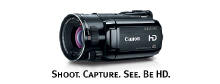 |
Canon
Click Logo to see more details on
this camera... |
|
Canon
VIXIA HF S10 Camcorder gives a
huge, easy-to-view color SwivelScreen™ LCD and a massive 8.0 megapixel
camera, delivering exceptional Hi-Def quality digital
video, digital audio, and digital still images every time you turn
it on. |
|
|
Click Here for more camera news... |
|
