Do you have one of a kind photographs with no
negative? Don't worry, ShotCopy along with your digital camera can
copy those photos up to 4 x 5 inches. If you have larger image,
you can lay the picture on the table and take a picture of a picture with your
digital camera. You'll be amazed at the results!
The Basics of
Photographic
Copying using ShotCopy
Step One -
Mount the Print
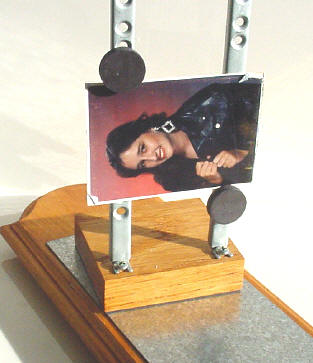
Use the magnetic pins to hold the print
to the rails of the slide/negative copy stand. Adjust the print so it
is level and square with the front of your camera lens to prevent
image distortion.
If you have a problem with photo reflections from
your cameras point of view, use a piece of flat black construction paper and cut a hole
for the camera lens to block reflections. Also, angle your shaded lamp or light source so
that it hits the image at a 45 degree angle to reduce reflections.
Step Two -
Shadows
Make sure there are no
shadows being cast on the area of the picture you want to copy. In
this case the magnetic pins were moved to the bottom of the photo to
stop shadows from being cast.
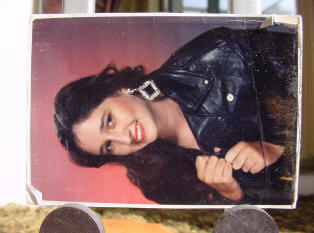
This photo
was kept in a wallet. Note the dog-ears, fading and dust spots.
Step Three
- Crop & Cleanup
User your photo
editing software to crop and compose the
image to remove damage edges and give the picture a better
composition. Remove dust and
scratches. In this picture to the right you can see a scratch or fold
across the hand plus a number of white dust spots and some
discoloration.
Step Four
- Saving your image
Save your image in the photo file format
of your choice. Usually a JPG or TIFF format. This photo will no
longer collect dust, become wrinkled or bend or fade away with time.
As a digital image you can e-mail it to friends and family and even
use it in a CD-ROM photo album of your creation.




 Serving Satisfied Customers
Since 1997
Serving Satisfied Customers
Since 1997
